 Published
Turning Trilium Into a Blog
Just use Wordpress! How about Ghost? Just use a static site with github pages! I know they're all pretty much the go to standards for these things and I have used them, but something never felt entirely right…
Over the years I have started (multiple times) on updating my site and creating a blog. I found during my process that I would always get stuck on something. Not because they weren't good or didn't have features I needed, but it always felt like a job, that I didn't own it, that I was trying to do more than what I wanted. I needed a way to use my content as if they were notes, I could come in throw an idea into a new note and expand on it. I never really felt that with any of the options I tried.
So, I tried making my own.
I know… How unique right?

My goal isn’t to create a new standard. I like to think of a blog post as just another note—something that might never be read by anyone, maybe not even by me again. And that’s okay. Over the past few years, I’ve found joy in writing and in occasionally sharing my words with others. Still, I’ve never quite found the perfect fit for how I want to accomplish that task.
Ultimately, I would say my goal for blogging is
A way to get what's in my head - out of it.
Such a simple thing! Yet it can be challenging for a variety of reasons. I don't want writing to feel like a chore, a job, or an obligation that I eventually find myself procrastinating on. I want it to feel like I am simply taking notes.
Previous Tries#
I want to stress that just because some of these options didn’t work for me doesn’t mean they won’t work for you. Many of these systems have great features, and there’s a reason they’re so popular and widely used! Honestly, it’s fair to say the work going into this over time is probably much more than if I’d just gone with one of the existing platforms. However, as a web/developer I also get a sense of satisfaction of making something specific that will fit what I need.
In no specific order, I went through a few different frameworks over the years. All have their pros and cons and they have been called out in many other places.
The route that lead me here#
They're all very robust and have a lot of great features. Ultimately the method I chose could probably be easily integrated into the other frameworks too, especially after I create a library. I eventually stumbled on Svelte/SvelteKit which is a UI framework and a full-stack app framework, SvelteKit is built on top of Svelte.
I enjoyed Svelte's syntax, the structure, the setup, and the quick process to get familiar with it. Having originally done web development in PHP ages ago and eventually ASP.NET/Blazor the transition felt a lot easier for me, this could be coincidental, but it just made sense to me. I worked with Sveltekit and quickly made my own site which was previously written in Nuxtjs and migrated over to Sveltekit. I didn't have a blog, but the idea stuck with me and while making my own site I found mdsvex which allows Sveltekit to take markdown pages and turn them into components and pages.
I spent some time experimenting with SvelteKit and mdsvex, eventually building projects with them and occasionally revisiting the idea of creating a good setup for a blog. Working with mdsvex helped me get more comfortable with Svelte overall, but I found the default mdsvex markdown had some drawbacks. For instance, images were referenced from the static assets folder , and the folder structure would typically look like this
src/
└── content/
    └── 2024/
        └── 10/
            └── my post/
                └── index.md
static/
└── images/
    └── screenshot.png
I didn’t quite like this as the content and its resources were separated, leaving it harder to organize and know which images were being used. It would be much more convenient to have the images alongside the post, keeping things compartmentalized and easy to copy or duplicate. This idea is shown in the following structure which better keeps the content of a blog post together.
src/
└── content/
    └── 2024/
        └── 10/
            └── my post/
                ├── index.md
                └── images/
                    └── screenshot.png
I ended up creating my own plugin, called mdsvex-enhanced-images, to handle relative image paths using syntax like , resolving the image relative to the index.md file. The challenge was that Svelte doesn’t like accessing images from inside the src folder or anywhere except the static folder. While there are workarounds, I didn’t want to hack or alter how Svelte fundamentally works. Instead, I integrated the images into the build process using SvelteKit’s enhanced:img component, which optimizes and packages them into the project. If you have done any type of web development, you're probably familiar with this process.
This meant all instances of  in the markdown would be replaced with the proper code for SvelteKit to import the image and use it in an <enhanced:img src={img} /> and when SvelteKit built the site it would then successfully replace the enhanced:img with the expected required html.
And it worked! For a while…
Eventually time passed and something changed that required the enhancedImage to come before svelteKit in the plugin definitions.
import { sveltekit } from '@sveltejs/kit/vite';
import { enhancedImages } from '@sveltejs/enhanced-img';
import { defineConfig } from 'vite';

export default defineConfig({
	plugins: [
		enhancedImages(), // must come before the SvelteKit plugin
		sveltekit()
	]
});
This caused the enhanced:img in the markdown to skip processing in the SvelteKit preprocessor. I’m not sure if placing it afterward was a bug or intentional, but either way, the change broke the plugin. To read more about the issue itself you can see the git issue and notes mentioned here.
With my plugin not working I moved over to markdoc-svelte and it was very easy to implement what I had implemented in mdsvex into markdoc (Relative image paths · Issue #25 · CollierCZ/markdoc-svelte)
With relative image paths working I ran into another problem that I knew about but was hoping to find a resolution along the way.
Images in the repository#
With a static site in svelte this meant all images were included in the build process and the repository. While not a huge problem in itself, it is a pretty common thing to do - especially in a static site. The issue stuck with me… do I really want to include the images in the repo? Although I'm sure I wouldn't have hit enough images for it to be an issue, I think it's better to limit large images and files in a repo. Which left me yet again at a point where I didn't want to keep moving forward with something I didn't feel good about.
Where does that leave us?#
I want the process of writing to feel more like taking notes, not me scheduling time to sit down and write something. Which leads me to the idea a friend had… Why not use your note taking app as a place to write your blogs, more of a journal type experience.
I tried Astro for a bit and thought it was fine, but I much preferred SvelteKit. He also used Obsidian, which is a great app and popular among many! That said, I prefer a more structured hierarchy for my notes, and the last time I used Obsidian, it didn’t handle that well. I also wanted my notes accessible via an easily accessible site so I could get to them from work or my phone. While Obsidian has some third-party plugins and tools for this, it’s ultimately a local-first note-taking app.
I initially thought of AppFlowy and I think it could work, but instead I stumbled upon Trilium and something about it stood out to me instead.
Trilium Notes is a free and open-source, cross-platform hierarchical note taking application with focus on building personal knowledge bases.
This sounded good to me! The feature list looked robust as well! It has an API, relationships, link maps, and everything I could need. This feature list is taken directly from their readme.
- Notes can be arranged into arbitrarily deep tree. Single note can be placed into multiple places in the tree (see cloning)
- Rich WYSIWYG note editor including e.g. tables, images and math with markdown autoformat
- Support for editing notes with source code, including syntax highlighting
- Fast and easy navigation between notes, full text search and note hoisting
- Seamless note versioning
- Note attributes can be used for note organization, querying and advanced scripting
- UI available in English, German, Spanish, French, Romanian, and Chinese (simplified and traditional)
- Direct OpenID and TOTP integration for more secure login
- Synchronization with self-hosted sync server
- there's a 3rd party service for hosting synchronisation server
- Sharing (publishing) notes to public internet
- Strong note encryption with per-note granularity
- Sketching diagrams, based on Excalidraw (note type "canvas")
- Relation maps and link maps for visualizing notes and their relations
- Mind maps, based on Mind Elixir
- Geo maps with location pins and GPX tracks
- Scripting - see Advanced showcases
- REST API for automation
- Scales well in both usability and performance upwards of 100 000 notes
- Touch optimized mobile frontend for smartphones and tablets
- Built-in dark theme, support for user themes
- Evernote and Markdown import & export
- Web Clipper for easy saving of web content
- Customizable UI (sidebar buttons, user-defined widgets, ...)
- Metrics, along with a Grafana Dashboard
Not only that it has the hierarchy method I prefer and many of the custom scripting and tools needed to complete what I would need. This could be the solution for everything! It can store the images with the posts; it has a built-in share option which allows only specific notes to be public, and an API that would allow me to integrate it into anything.
Creating The Blog#
Now that I knew that I wanted to use Trilium and SvelteKit. It was a matter of combining the two!
I set up an instance of it in Docker and started exploring it by creating notes and exploring its features. It’s pretty straightforward for a note taking app but it also has advanced features for power users.
To start, here’s what the structure of a blog post looks like at this point in Triliums tree hierarchy.
.
└── Blog/
    ├── Drafts/
    │   └── A future blog post
    └── Published/
        └── 2025/
            └── 11/
                └── 26/
                    └── Turning Trilium into a blog/
                        └── thumbnail.jpg
When a post is published it gets placed into a path organized by year, month, and day. This will eventually be customizable when choosing to publish. Right now, you can make any path structure you want, and it will use the hierarchy for its slug path. This comes from a custom frontend js script in Trilium which gets the path up to the first parent that has a label of #BlogPublished. Using a label instead of the name means you could name the folder/parent note anything you may want.
async getPublishedPath(note) {
    const path=[];
    let current=note;

    while (current) {
        const parents=await current.getParentNotes();
        if ( !parents || parents.length===0) break;

        current=parents[0];
        if ( !current) break;

        // Stop if we find #BlogPublished (don't include it)
        if (current.hasLabel && current.hasLabel("BlogPublished")) {
            break;
        }

        path.unshift(current.title);
    }

    // Remove leading slash if present
    return path.join("/").replace(/^\//, '');
}


slugify(text) {
    return text
        .toLowerCase()
        .trim()
        .replace(/[^\w\s-]/g, '')  // Remove special chars
        .replace(/[\s_]+/g, '-')   // Replace spaces/underscores with hyphens
        .replace(/^-+|-+$/g, '');  // Trim hyphens from ends
}
Using these functions, it will then add/update a label on the note itself to have it as a slug.
// Create full slug: /path/slugified-title
const slugifiedTitle = this.slugify(note.title);
const fullSlug = `${publishPath}/${slugifiedTitle}`;
await this.updateNoteLabel(note, "slug", fullSlug);
For example, the slug for this post is currently 2025/11/26/turning-trilium-note-app-into-a-blog-along-side-my-notes and the tree view for it looks like this.
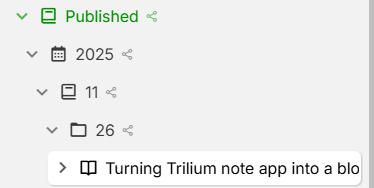
One of the caveats to a note type of text which this post is, is if you attach an image to it, it HAS to be used in the content of the note. This sounds odd at first but learning why - it makes sense. Any image that isn't in the content will be automatically cleaned up, this is on purpose to ensure you don't have images for a document that aren't being used, and the system will automatically reduce its size by cleaning up these attachments. What this means is I couldn't keep a thumbnail as an attachment to the text itself as the backend would clean up the attachment. This meant I had to come up with a different way to define a thumbnail.
In the previous image of the hierarchy, you will see the blog post itself is expandable. If you look underneath this is where I have placed the thumbnail, at first, I wasn't a huge fan of this, but it has actually grown on me.

In a similar fashion to the slug path I use a frontend script that automatically updates an attribute on the note with the thumbnail path. Although there are still calls to get the thumbnail it is all based within Trilium itself at the time of editing. This makes it easier to retrieve the thumbnail image as part of the note itself in any frontend.
Here is an example of attributes used.
~template=BlogTemplate
#publishDate=2025-11-26
#thumbnail="share/api/images/ijAPIpA6rPqQ/thumbnail"
#BlogPath="2025/11/26"
#slug="2025/11/26/turning-trilium-note-app-into-a-blog-along-side-my-notes"
#description="I transformed Trilium Notes, a hierarchical note-taking app, into a customizable blogging platform by using note templates, attributes, and the API to organize and publish posts directly from my personal knowledge base. This approach gave me full control over content creation, management, and blog presentation from within a powerful note system."
#tags=trilium,sveltekit,blog,programming
Using these attributes means in the frontend when I use the API to query for the blog posts it will automatically include these attributes. This means I do not have to have any extra queries just to get basic information.
The only time a second query is needed is when I want to display the content of the note itself.
Fixing Cross Origin Resource Policy#
Sharing is a built-in feature in Trilium that by default will either allow or not allow people to view content. Anything in the Published folder will automatically be marked as shared since we marked the Parent as shared all children will have that same setting.
There was a major issue though, images embedded in the note wouldn’t load. After confirming it wasn’t an issue in my own code, I began investigating how Trilium handled images and notes, and once again, everything suggested that sharing should work. After an hour of digging through code I looked closer at the headers of the image itself.
Can you spot the issue?
The header of the images was being locked to a same-origin policy that prevented images and other resources from being served to my site since I use subdomains. When reading more about resource policy it became clear that this was my issue.
Luckily Trilium has a configuration file!
# setting the CORS headers for cross-origin requests
# corsAllowOrigin='mysite.com'
# corsAllowMethods='GET,POST,PUT,DELETE,PATCH'
# corsAllowHeaders='Content-Type,Authorization'
Hmmm… that won't do. There doesn't appear to be a setting for the resource policy. “It must be there!” I thought - just not defined in the documentation or the config template.
Turns out no… It wasn't anywhere to be found in the code either.
    app.use((req, res, next) => {
        // set CORS header
        if (config["Network"]["corsAllowOrigin"]) {
            res.header("Access-Control-Allow-Origin", config["Network"]["corsAllowOrigin"]);
        }
        if (config["Network"]["corsAllowMethods"]) {
            res.header("Access-Control-Allow-Methods", config["Network"]["corsAllowMethods"]);
        }
        if (config["Network"]["corsAllowHeaders"]) {
            res.header("Access-Control-Allow-Headers", config["Network"]["corsAllowHeaders"]);
        }

        res.locals.t = t;
        return next();
    });

    if (!utils.isElectron) {
        app.use(compression()); // HTTP compression
    }


    app.use(
        helmet({
            hidePoweredBy: false, // errors out in electron
            contentSecurityPolicy: false,

            crossOriginEmbedderPolicy: false
        })
    );
Trilium uses helmet.js which can be seen in the code block above. The setting within helmet.js is by default is set to same-origin. So, there was my issue! Trilium itself was blocking cross origin resources even for same-site.
I forked the project and started looking closer at how it uses the config file to specify CORS. After a while (and some help from AI to get a grasp of the structure of the project) I had the new configuration options integrated into the code and helmet updated to use that new option.
    app.use((req, res, next) => {
        // set CORS header
        if (config["Network"]["corsAllowOrigin"]) {
            res.header("Access-Control-Allow-Origin", config["Network"]["corsAllowOrigin"]);
        }
        if (config["Network"]["corsAllowMethods"]) {
            res.header("Access-Control-Allow-Methods", config["Network"]["corsAllowMethods"]);
        }
        if (config["Network"]["corsAllowHeaders"]) {
            res.header("Access-Control-Allow-Headers", config["Network"]["corsAllowHeaders"]);
        }

        res.locals.t = t;
        return next();
    });

    if (!utils.isElectron) {
        app.use(compression()); // HTTP compression
    }

    let resourcePolicy = config["Network"]["corsResourcePolicy"] as 'same-origin' | 'same-site' | 'cross-origin' | undefined;
    if(resourcePolicy !== 'same-origin' && resourcePolicy !== 'same-site' && resourcePolicy !== 'cross-origin') {
        log.error(`Invalid CORS Resource Policy value: '${resourcePolicy}', defaulting to 'same-origin'`);
        resourcePolicy = 'same-origin';
    }

    app.use(
        helmet({
            hidePoweredBy: false, // errors out in electron
            contentSecurityPolicy: false,
            crossOriginResourcePolicy: {
                policy: resourcePolicy
            },
            crossOriginEmbedderPolicy: false
        })
    );
I tested my changes locally and BAM! the pictures started working with a same-site origin. You can view all the changes on the pull request which has now been merged. I don't think this was an oversight or a bug from the past developers of Trilium. It was something that wasn't really thought of and hadn't been needed until I guess I started trying to do crazier things with it.
I want to insert a little note here to say thank you eliandoran He was very quick in responding on Github and looks to be one the main contributors for Trilium and keeping it going!
Now… With the resource policy fix being merged it means I can move forward.
Blog Posts… Finally!#
So with most of the initial things needed I was able to get a proof of concept to work. Using a custom template, I was able to make aspects of a blog post have less repeatable settings. This means all of my BlogPosts will derive from this template and any features can be added to the template and it will automatically be added to the notes that inherit from it.
Trillium's search API has an easy to use yet advanced search functionality that allows you to query almost any piece of a note using attributes, labels, relations, type coercion, negation, properties, and more. To make writing the Trilium queries easier I created a wrapper that allows me to use typescript to create the queries automatically.
const notes = await searchNotes({
	AND: [
		{ "#blogPost": true }, // Only notes with the #blogPost attribute
		{ "~template.title": "BlogTemplate" }, // Only notes that use the BlogTemplate as its template.
		{ "note.ancestors.noteId": "_share" } // Ensures it only selects notes that I have shared
	],
}, {
	orderBy: "note.utcDateCreated",
	orderDirection: "desc"
});Widgets#
Although you wouldn't need widgets to make this all work it can make writing blog posts easier in Trilium. As an example, here is a word count widget that Trilium includes in a fresh instance.
class BlogPostWidget extends api.NoteContextAwareWidget {
get position() { return 100; }
get parentWidget() { return 'right-pane'; }
constructor() {
super();
this.isDraft = true;
}
isEnabled() {
if (!super.isEnabled()) return false;
return this.note?.hasLabel("BlogPost");
}
doRender() {
this.$widget = $(`
<div class="blog-post-container">
<div class="draft-flag" style="padding: 8px 10px; margin: 8px 10px 4px; border-radius: 12px; font-weight: 600; font-size: 0.9em; display: none; text-align: center; border: 1px solid var(--main-border-color);"></div>
<div class="thumbnail-info" style="padding: 10px; border-top: 1px solid var(--main-border-color); margin-bottom: 10px; text-align: center;">
<img class="thumbnail-image" style="max-width: 100%; height: auto; border-radius: 4px; display: none;" />
</div>
<div class="slug-info" style="padding: 10px; border-top: 1px solid var(--main-border-color); margin-bottom: 10px;">
<strong>Slug: </strong>
<span class="slug-value">-</span>
</div>
<div class="word-count-info" style="padding: 10px; border-top: 1px solid var(--main-border-color); margin-bottom: 10px;">
<strong>Word Count: </strong>
<span class="word-count-value">-</span>
|
<strong>Characters: </strong>
<span class="character-count-value">-</span>
</div>
<div class="publish-actions" style="padding: 10px; border-top: 1px solid var(--main-border-color);">
<button class="btn btn-primary publish-btn" style="width: 100%;">
Publish Post
</button>
<div class="published-info" style="display: none; padding: 10px; background: var(--accented-background-color); border-radius: 4px;">
<div style="font-weight: bold; color: #4de64d; margin-bottom: 5px;">✓ Published</div>
<div style="font-size: 0.9em;">This post is published. Any edits you make will automatically update the published version.</div>
<div class="publish-date" style="font-size: 0.85em; margin-top: 5px; color: var(--muted-text-color);"></div>
</div>
<div class="publish-status" style="margin-top: 8px; font-size: 0.9em; color: var(--muted-text-color);"></div>
</div>
</div>
`);
this.$slug = this.$widget.find('.slug-value');
this.$publishStatus = this.$widget.find('.publish-status');
this.$thumbnailImage = this.$widget.find('.thumbnail-image');
this.$wordCount = this.$widget.find('.word-count-value');
this.$characterCount = this.$widget.find('.character-count-value');
this.$draftFlag = this.$widget.find('.draft-flag');
this.$publishBtn = this.$widget.find('.publish-btn');
return this.$widget;
}
async refreshWithNote(note) {
this.BlogRoot = await this.getClosestAncestorWithLabel(note, this.LabelBlog)
this.Drafts = await this.getChildWithLabel(this.BlogRoot, "Drafts")
this.Published = await this.getChildWithLabel(this.BlogRoot, "Published")
this.isDraft = await note.hasLabel("BlogDraft");
if (this.isDraft) {
this.$draftFlag
.text("Draft")
.css({ background: "#d76a3f", color: "#fff" })
.show();
this.$blogPath.closest('.blog-path-info').hide();
this.$publishBtn.show();
} else {
this.$draftFlag
.text("Published")
.css({ background: "#2f9d5b", color: "#fff" })
.show();
const publishPath = await this.getPublishedPath(note);
// Create full slug: /path/slugified-title
const slugifiedTitle = this.slugify(note.title);
const fullSlug = `${publishPath}/${slugifiedTitle}`;
await this.updateNoteLabel(note, "slug", fullSlug);
this.$slug.text(fullSlug).closest('.slug-info').show();
this.$publishBtn.hide();
}
const thumbnailUrl = await this.setThumbnailUrl(note);
// Display thumbnail image if URL exists
if (thumbnailUrl) {
this.$thumbnailImage.attr('src', thumbnailUrl).show();
} else {
this.$thumbnailImage.hide();
}
// Update word count
const {content} = await note.getBlob();
const text = $(content).text();
const chunks = text.split(/[\s-+:,/\\]+/).filter(c => c !== '');
const words = chunks.length === 1 && chunks[0] === '' ? 0 : chunks.length;
const characters = chunks.join('').length;
this.$wordCount.text(words);
this.$characterCount.text(characters);
await this.updateNoteLabel(note, "wordCount", words);
}
async getPublishedPath(note) {
const path = [];
let current = note;
while (current) {
const parents = await current.getParentNotes();
if (!parents || parents.length === 0) break;
current = parents[0];
if (!current) break;
// Stop if we find #BlogPublished (don't include it)
if (current.hasLabel && current.hasLabel("BlogPublished")) {
break;
}
path.unshift(current.title);
}
// Remove leading slash if present
return path.join("/").replace(/^\//, '');
}
async updateNoteLabel(note, key, value) {
if (!note || !key) return false;
const labelKey = key.trim();
if (!labelKey) return false;
const ctorName = note.constructor?.name; // "FNote" in frontend, "BNote" in backend
if (ctorName === "BNote") {
// Already in backend
note.setLabel(labelKey, (value ?? "").toString());
return true;
}
if (ctorName === "FNote") {
return api.runOnBackend((noteId, k, v) => {
const target = api.getNote(noteId);
if (!target) return false;
target.setLabel(k, (v ?? "").toString());
return true;
}, [note.noteId, labelKey, value]);
}
return false;
}
slugify(text) {
return text
.toLowerCase()
.trim()
.replace(/[^\w\s-]/g, '') // Remove special chars
.replace(/[\s_]+/g, '-') // Replace spaces/underscores with hyphens
.replace(/^-+|-+$/g, ''); // Trim hyphens from ends
}
async setThumbnailUrl(note) {
if (!note) return null;
// Find first child image note
const children = await note.getChildNotes();
const imageChild = children.find(child => child.type === 'image');
if (imageChild) {
// Get or create share for the image and build thumbnail URL
const shareInfo = await api.runOnBackend((imageNoteId, postNoteId, isShared) => {
const imgNote = api.getNote(imageNoteId);
let share = imgNote.shareId;
let url = `api/images/${share}/thumbnail`;
if(isShared) {
url = `share/${url}`
}
// Set the thumbnail label on the post note
const postNote = api.getNote(postNoteId);
postNote.setLabel('thumbnail', url);
return {
shareId: share,
thumbnailUrl: url
};
}, [imageChild.noteId, note.noteId, note.isShared()]);
if (shareInfo?.thumbnailUrl) {
return shareInfo.thumbnailUrl;
}
}
return null;
}
async getChildWithLabel(parentNote, label) {
if (!parentNote) return null;
const children = await parentNote.getChildNotes();
for (const child of children) {
if (child.hasLabel && child.hasLabel(label)) {
return child;
}
}
return null;
}
async getClosestAncestorWithLabel(label, startNote) {
const visited = new Set();
const queue = [startNote];
while (queue.length) {
const current = queue.shift();
if (!current || visited.has(current.noteId)) continue;
visited.add(current.noteId);
if (current.hasLabel && current.hasLabel(label)) {
return current;
}
try {
const parents = await current.getParentNotes();
for (const p of parents) {
if (p && !visited.has(p.noteId)) queue.push(p);
}
} catch (e) {
console.warn('Parent lookup failed:', e);
}
}
return null;
}
async entitiesReloadedEvent({loadResults}) {
if (loadResults.isNoteContentReloaded(this.noteId)) {
this.refresh();
}
}
}
module.exports = new BlogPostWidget();
Using this script adds a sidebar to anything with the #BlogPost label that provides me some information.
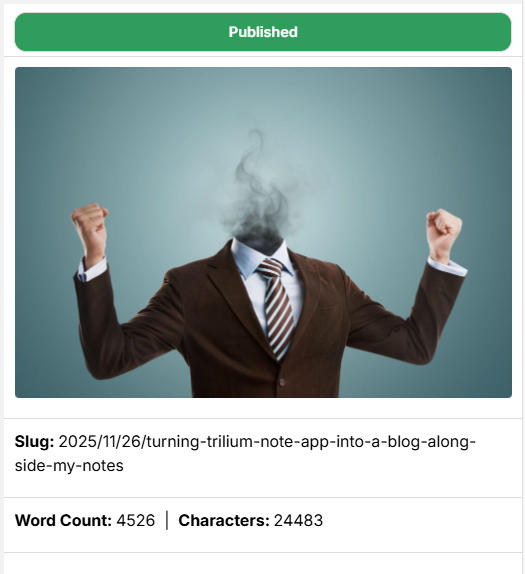
It is still very basic and needs to be updated to allow for possible custom slugs, being able to publish/unpublish notes, and be able to change the thumbnail without going to the thumbnail directly. Trilium offers a variety of options and note types that make working with it a truly enjoyable experience. While it has its quirks, it’s managed to handle everything I’ve needed, and if it hasn’t, there’s always the option to submit a pull request!
In addition to that the scripts themselves aren't anything special, they are just another note that you can reference in your hierarchy.
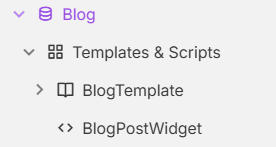
As I continue to work on this, I am sure things will change and improve, that's why this isn't a tutorial of HOW to do it but more of a concept that you could follow yourself and get close.
I hope to write another post about this in the future with a more official way to get something like this implemented in your instance. I also hope to eventually bring this forward to the project and add it as a feature built into Triliums share feature.
Accessing the info#
In my Svelte front end, I wrote a small library that uses the Trilium search endpoint to make it easier to query and manage what I get. The query below returns an array of TriliumNote objects.
const notes = await trilium.searchNotes(
  {
    AND: [{ "note.parents.title": "Gallery" }, { "note.type": "image" }],
  },
  {
    orderBy: "note.utcDateCreated",
    orderDirection: "desc",
  }
);
I also wrote an automatic mapper that can directly map note attributes to properties in my object.
export interface BlogPost extends StandardBlogPost {
    publishDate: Date;
    wordCount: number;
    readTimeMinutes?: number;
}

export interface BlogPostWithContent extends BlogPost {
    content: string;
}

// Merge StandardBlogPost config with blog-specific fields
export const BlogPostMapping = TriliumMapper.merge<BlogPost>(
    StandardBlogPostMapping,
    {
        publishDate: {
            from: '#BlogPath',
            transform: transforms.date,
            required: true
        },
        wordCount: {
            from: '#wordCount',
            transform: transforms.number,
            default: 0
        },
        readTimeMinutes: {
            computed: (partial: Partial<BlogPost>) => Math.ceil((partial.wordCount || 0) / 200),
            default: undefined
        }
    }
);
This allows anybody using the code to map anything from a note directly into a typescript object.
In my blog service I then use something similar to
export const getBlogPosts = async () => {
    const cached = cache.get<BlogPost[]>('blog:posts');
    if (cached) {
        return cached;
    }


	//
     const notes = await trilium.searchNotes({
        AND: [
            { "#BlogPost": true },
            { "note.ancestors.noteId": "_share" }
        ],
    });

    const blogPosts = blogPostMapper.map(notes)
        .sort((a, b) => b.publishDate!.getTime() - a.publishDate!.getTime());

    cache.set('blog:posts', blogPosts);
    return blogPosts;
};
One thing that is also pretty cool is because of Trillium's built in method of sharing this entire post is also accessible from Turning Trilium Into a Blog - Published
Give Some Love!#
I want to end this by giving some love to a few repositories!